The Gremlin in the Machine: Automating Chaos Engineering with AI and MCP

Updated: Apr 28
As an SRE working on high-throughput trading systems, "hope" is not a valid reliability strategy. We don't wait for the network to degrade at 2 AM to find out if our retry logic and circuit breakers actually work. We force the failure during business hours.
We call these Game Days. We inject latency, drop packets, and kill pods to ensure our systems degrade gracefully. But coordinating these chaos experiments is usually a highly manual, script-heavy process. You need one engineer running the chaos tools, and two others staring at Datadog to see if the platform survives.
Lately, I've been experimenting in my home lab to see if we can use Gen AI to completely automate this. The missing link has always been giving the AI a safe, standardized way to execute disruptive commands.
Enter the Model Context Protocol (MCP). By building a custom MCP "Chaos Server," we can turn an LLM into an autonomous Chaos Engineer that not only breaks the system but simultaneously observes the fallout.
The Concept: The AI Chaos Agent
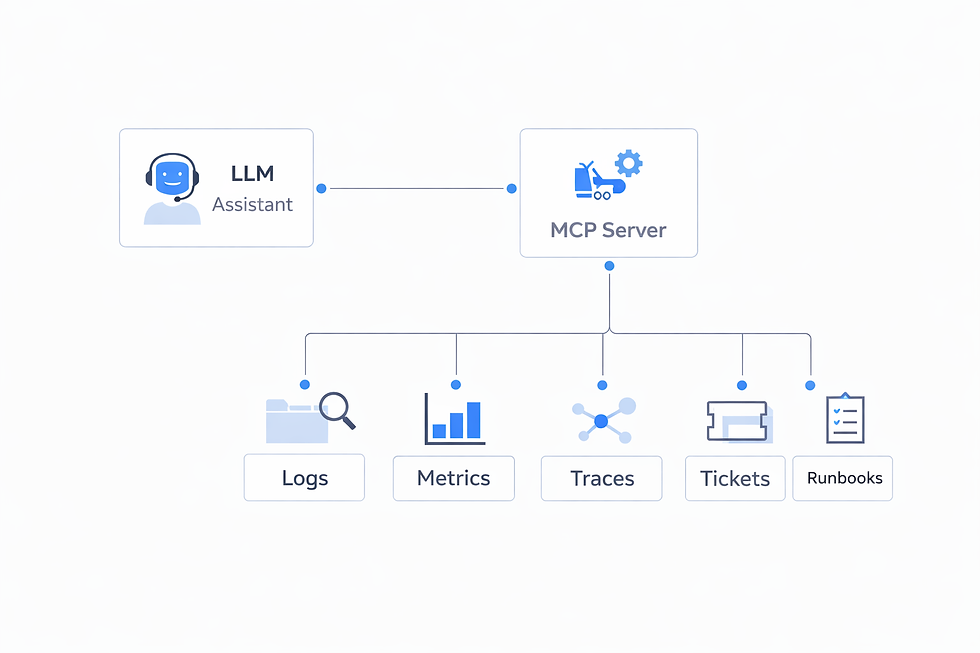
For this experiment, we aren't just giving the AI read-only access. We are handing it the keys to tc (Traffic Control) and netem (Network Emulator) via a localized MCP server. But running these tools on your main production machines or your laptop is dangerous.
Instead, we use a Raspberry Pi as a dedicated, physical "Chaos Node." Sitting on the same network as your homelab or edge cluster, this Pi acts as a jump box. We run our MCP Chaos Server directly on the Pi, isolating the blast radius. The AI securely connects to the Pi, and the Pi executes the disruptive network commands against our target services.
The Goal: Instruct the AI assistant to safely inject network latency into a specific downstream dependency, monitor the platform's response, and automatically roll back the chaos if the error rate breaches our Service Level Objectives (SLOs).
Step 1: Building the Chaos Server
First, we SSH into our Raspberry Pi and install the FastMCP Python SDK. We write a lightweight server script directly on the Pi. This script exposes tools that allow the AI to manipulate network traffic routing through or targeted by the Pi.
from mcp.server.fastmcp import FastMCP
import subprocess

# This runs ON the Raspberry Pi
mcp = FastMCP("Raspberry Pi Chaos Node")

@mcp.tool()
def inject_network_latency(interface: str, delay_ms: int, jitter_ms: int = 10) -> str:
    """Injects network latency into a specific interface using tc netem."""
    try:
        # Command: tc qdisc add dev eth0 root netem delay 100ms 10ms
        cmd = f"sudo tc qdisc add dev {interface} root netem delay {delay_ms}ms {jitter_ms}ms"
        subprocess.run(cmd.split(), check=True, capture_output=True)
        return f"SUCCESS: Injected {delay_ms}ms latency (±{jitter_ms}ms jitter) on {interface}."
    except subprocess.CalledProcessError as e:
        return f"FAILED to inject latency: {e.stderr.decode()}"

@mcp.tool()
def drop_network_packets(interface: str, loss_percentage: int) -> str:
    """Simulates network packet loss on a specific interface."""
    try:
        cmd = f"sudo tc qdisc add dev {interface} root netem loss {loss_percentage}%"
        subprocess.run(cmd.split(), check=True, capture_output=True)
        return f"SUCCESS: Configured {loss_percentage}% packet loss on {interface}."
    except subprocess.CalledProcessError as e:
         return f"FAILED to drop packets: {e.stderr.decode()}"

@mcp.tool()
def rollback_chaos(interface: str) -> str:
    """Removes all traffic control rules, restoring normal network behavior."""
    try:
        cmd = f"sudo tc qdisc del dev {interface} root"
        subprocess.run(cmd.split(), capture_output=True)
        return f"SUCCESS: Chaos rolled back. Normal traffic restored on {interface}."
    except Exception:
        return "Note: No existing chaos rules found to delete."

if __name__ == "__main__":
    mcp.run()

Step 2: The Automated Game Day
I configure my AI client (Claude Desktop) to connect to three MCP servers simultaneously, and route the chaos tools directly through the Pi using SSH:
The Chaos Server (The script above).
The Prometheus Server (For querying live metrics).
The Kubernetes Server (For checking pod status).
{
  "mcpServers": {
    "pi-chaos-node": {
      "command": "ssh",
      "args": [
        "pi@192.168.1.X",
        "python3",
        "/home/pi/chaos_server.py"
      ]
    }
  }
}
Now, instead of manually typing tc commands and frantically tabbing over to Grafana, I start a Game Day conversation with the AI:
My Prompt: "We need to test the circuit breaker on the order-router. Please inject 300ms of latency into the market-data-cache node (interface eth0). Monitor the P99 latency and HTTP 500 error rates on the order router for the next 2 minutes. If the error rate exceeds 5%, immediately roll back the chaos and give me a summary."
Step 3: The AI Takes the Wheel
Here is where MCP fundamentally changes platform engineering. The LLM parses the intent and autonomously chains the tools together:
Execution: The AI calls inject_network_latency(interface="eth0", delay_ms=300).
Observation: The AI enters a loop, periodically calling the Prometheus MCP tool to run rate(http_requests_total{status="500", service="order-router"}[30s]).
Evaluation: It notices the error rate jumping to 8% (the circuit breaker failed to open and requests are timing out).
Remediation: Triggered by my safety constraint, it instantly calls rollback_chaos(interface="eth0").
The AI's Final Report:
"Game Day Experiment complete. I injected 300ms latency into eth0. Within 45 seconds, the order-router P99 latency spiked to 2.1s, and the HTTP 500 error rate breached the 5% threshold, peaking at 8.2%. I have automatically executed a rollback and network traffic is now nominal. \n\nConclusion: The circuit breaker configured for the market data cache did not trip as expected. We need to review the timeout threshold in the routing configuration."
The Takeaway: Breaking the Digital Barrier
Whether you are using it to safely inject network chaos, or setting it up to monitor the ambient temperature of your homelab rack, the underlying revelation is the same.
By adding a simple $35 Raspberry Pi running an MCP server to your architecture, you give your LLM a physical presence in the real world.
It stops being a chatbot that just summarizes logs. It becomes an active agent that can correlate a digital database timeout with an actual, physical heatwave in your server closet—or autonomously trigger a network failure and watch the circuit breakers trip in real-time.
That is the true power of the Model Context Protocol. It completely breaks the barrier between the AI's digital brain and your physical infrastructure. The era of isolated AI is over—what will you connect next?
Disclaimer: The Views expressed within this material are those of the contributor and not necessarily those of my employer


Comments